Hotel Analytics SoftwareReal-time hotel analytics.
From bookings to insights.
Room and ancillary revenue updated in real time, with intelligent AI Insights.
Works with




- Other private integrations
-
Data freshness
Seconds
From a booking made, changed or cancelled to your screen.
-
Onboarding
<24 hours
From read-only access to live figures. Often within the hour.
-
From day one
2 years
Of past bookings where available, plus everything already on the books.
The full picture is hidden in your booking data. Explorer brings it to light.
Three ways to see your revenue.
Commission distorts your ADR. Some sources deduct it first, others invoice it later.
The same £100 bookings across three different sources.
| ADR | ||
|---|---|---|
| Direct | £80 | |
| OTA (net, 15%)OTA (ex, 15%) | £68 | |
| GDS (gross, 15%)GDS (inc, 15%) | £80 |
Same £100 price, but the OTA booking shows a lower ADR because commission came off first.
Budget vs. reality.
Upload your budget once and Explorer keeps score. You’ll see which months and segments are ahead or behind while there’s still time to act.
Total revenue by month vs budget
Messy PMS segments? Group them. Roll them into clean lines, such as leisure, business and wholesale, then budget and report on the same lines.
AI that reads the data
so you don’t have to.
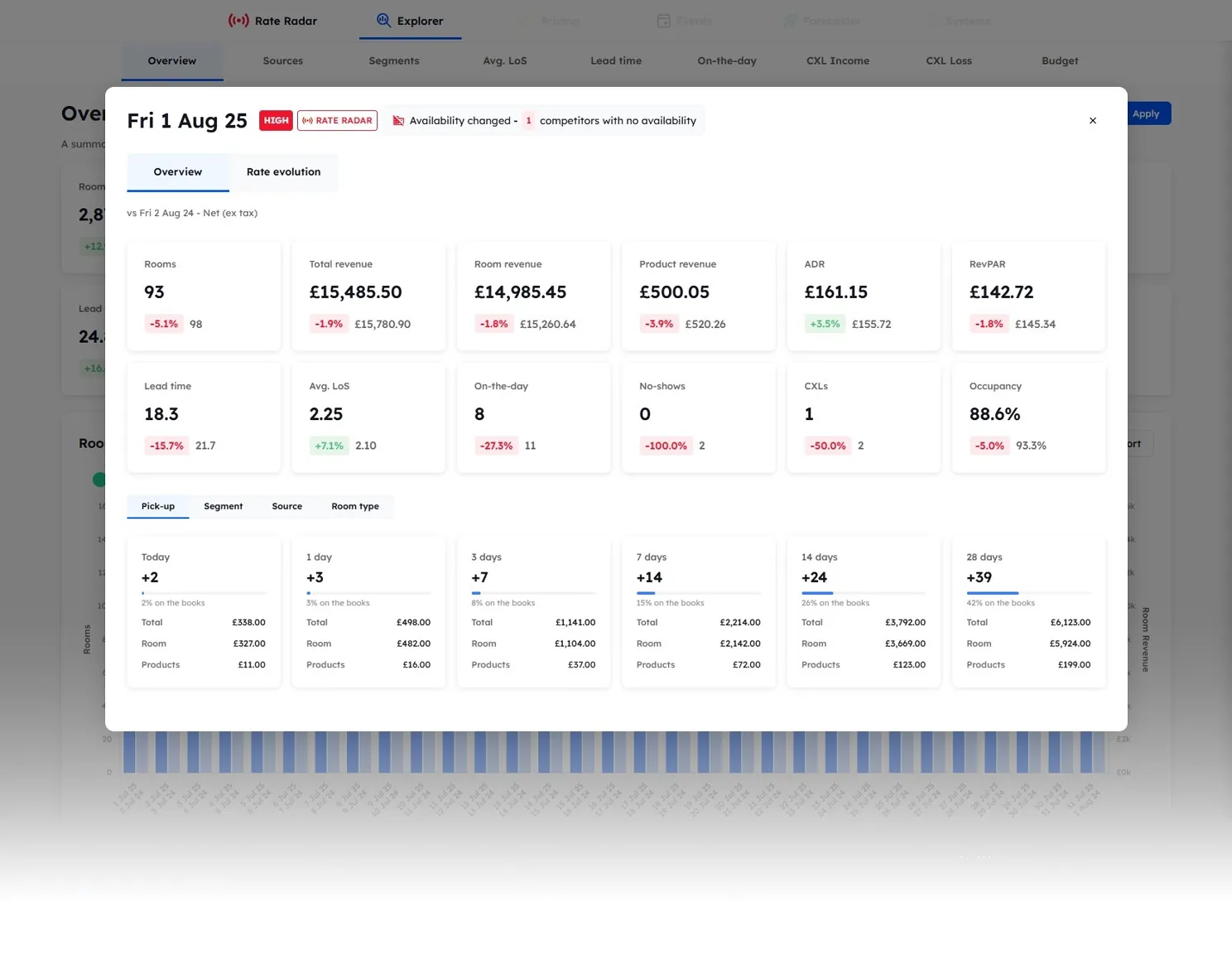
Every Explorer page includes an AI Insights panel. It analyses your booking data, then organises findings into three categories.
Anonymised before analysis. AI Insights receives booking figures only, never guest details or your hotel’s name or location, and the AI providers don’t train on what they receive.
Every number your hotel runs on.
Nine pages, from sources and segments to lead time and cancellations. Each with AI Insights, any comparison period and CSV export.
Performance & Distribution
Overview
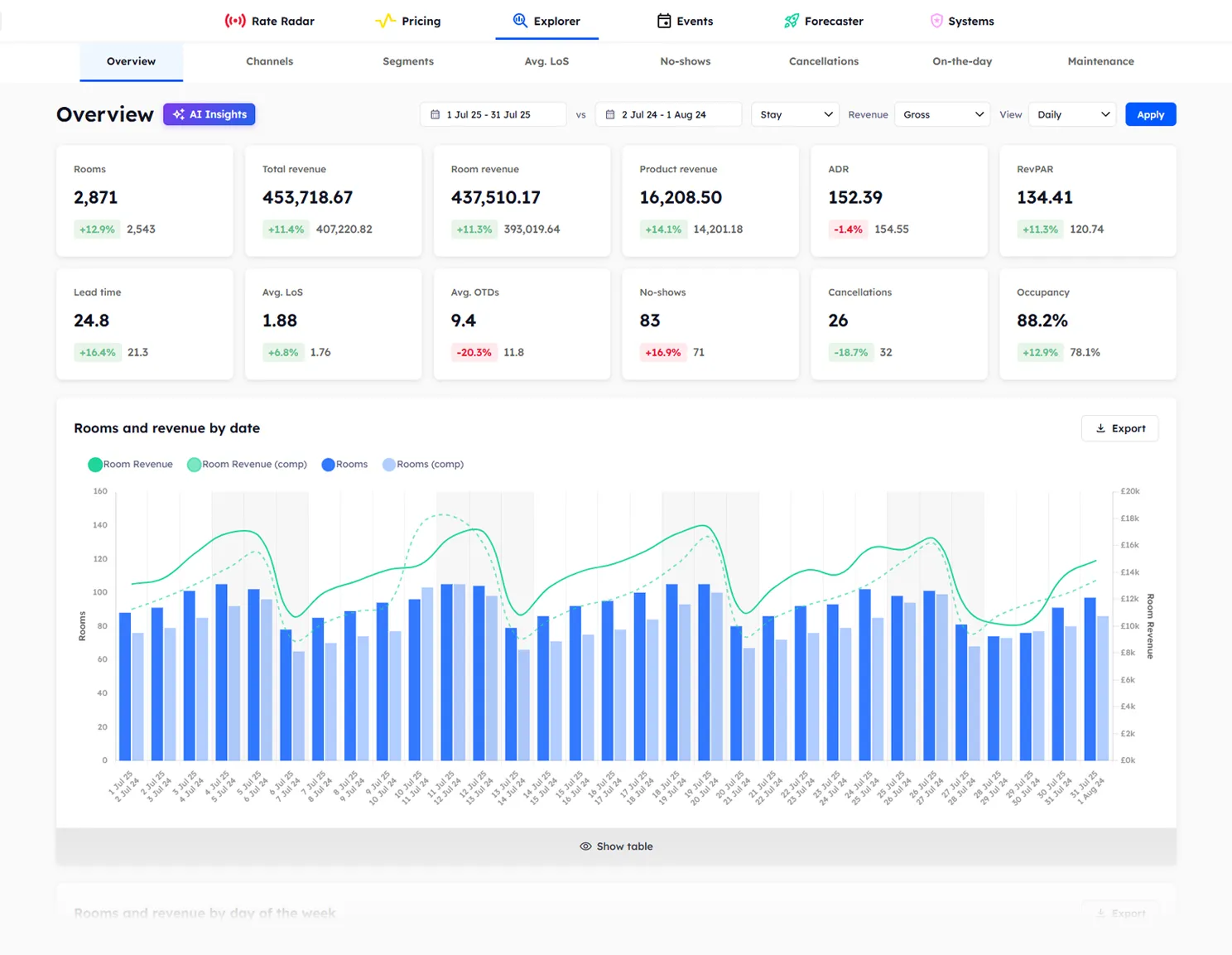
Rooms, occupancy, ADR and RevPAR, with room and ancillary revenue, against any period you choose.
Sources
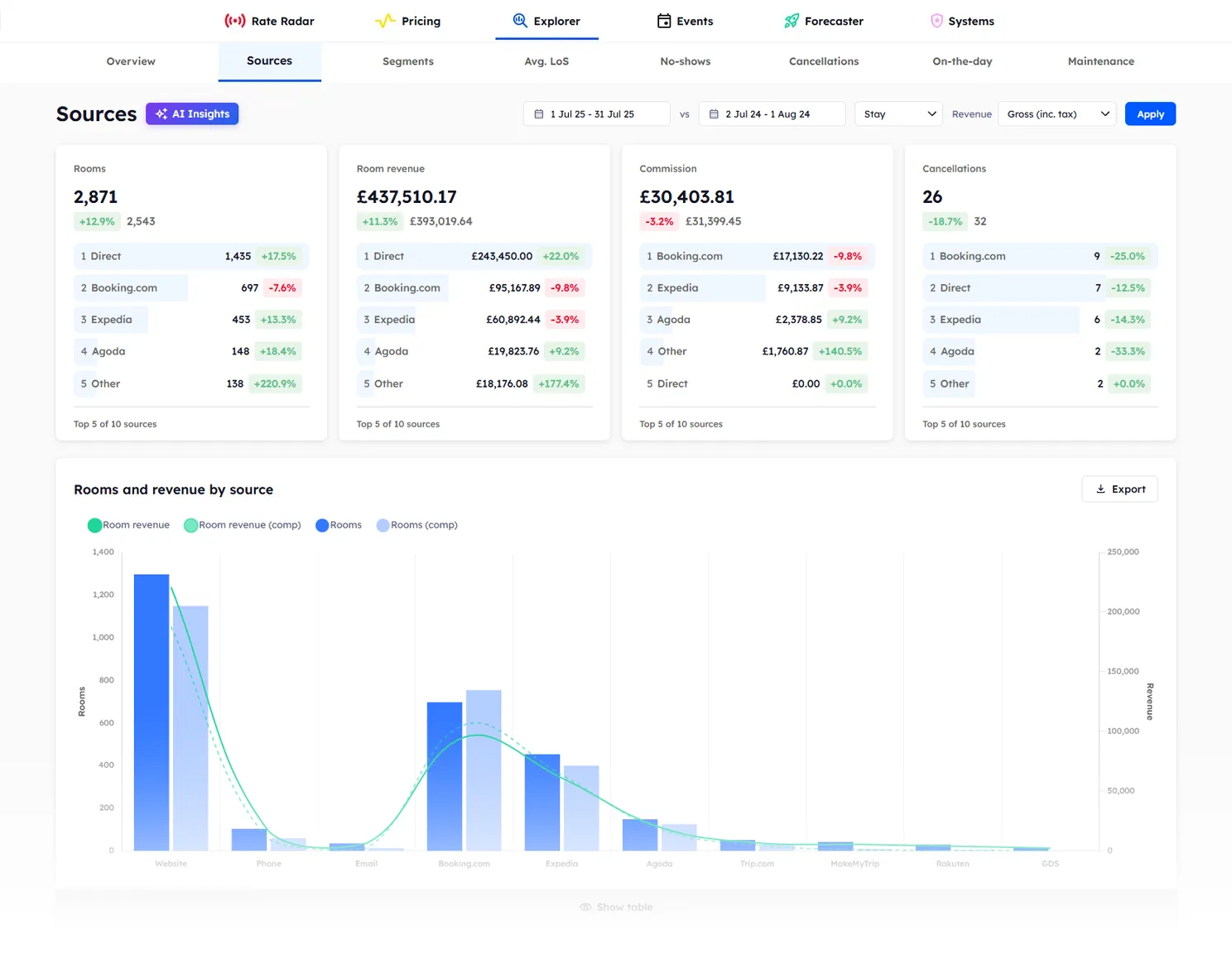
Understand your booking mix and what each source is really worth with accurate commission reporting.
Segments
Performance by segment. Group messy PMS segments in Beacon and report on clean lines.
Budget
Every month and every segment tracked against your uploaded budget, in real time.
Cancellations & No-Shows
CXL Income
The fees and non-refundable charges you kept from cancellations and no-shows, by date, room type, and segment.
CXL Loss
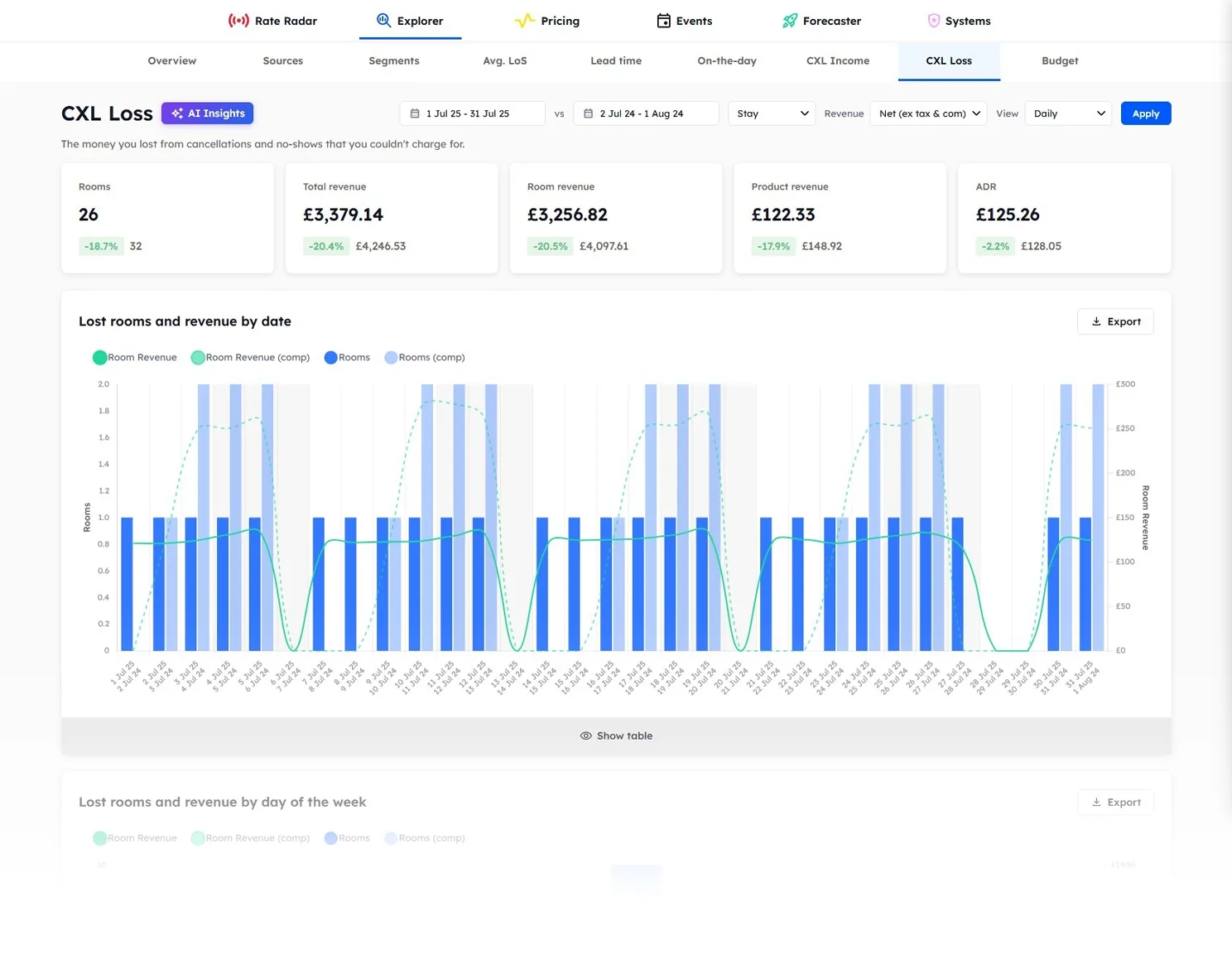
The revenue cancellations and no-shows cost you when there was nothing to charge, by date, room type, and segment.
Booking Patterns
Length of Stay
Identify stay patterns by date, day of week, room type, and segment.
Lead Time
See how far in advance guests book, split by date, room type, and segment.
On-The-Day
Bookings made for tonight, walk-ins included, with their ADR and revenue.
Explorer FAQs
Explorer is Beacon’s real-time reporting for hotels. It connects to your PMS and shows room and ancillary revenue, bookings, sources and segments, updated seconds after a booking is made, changed or cancelled. AI Insights on every page analyses the figures and brings out the positives, observations and concerns, so nothing important stays hidden in the reports.
Explorer connects directly to your PMS. Data updates in real time as bookings are made, modified, or cancelled. No booking exports, no manual imports, no overnight batch processes.
Gross (inc. tax) shows what the guest paid, adding back any commission taken before payment so every source compares fairly. Net (ex. tax) shows what your PMS recorded, after tax and any commission already deducted. Net (ex. tax & com) shows your room profit: what you keep after tax and all commission, including commission invoiced once the guest has checked out.
Every Explorer page includes a built-in AI Insights panel. It analyses your booking data for that page and organises the findings into three categories: Positives (growth and wins), Observations (patterns and context), and Concerns (anomalies and risks). Each insight includes a headline, a key metric with comparison, and a plain-language recommendation.
Yes. AI Insights only receives anonymised booking figures, such as rooms sold and revenue. Guest details, your hotel’s name and its location are never sent, and the AI providers don’t use what they receive to train their models.
Explorer includes 9 analytical pages: Overview (executive summary dashboard), Sources (booking mix and commission analysis), Segments (guest type breakdown), Length of Stay (stay pattern analysis), Lead Time (how far in advance guests book), On-The-Day (same-day booking analysis), CXL Income (fees and non-refundable charges kept from cancellations and no-shows), CXL Loss (revenue lost to cancellations and no-shows that could not be charged), and Budget (tracking against your uploaded budget).
Download the CSV template for the year, add room nights, ADR and product revenue for each month and segment, and upload it back. Explorer checks the file and flags any problems in plain English before saving. Re-upload at any time to replace the budget for that year.
Yes. Segment groups let you roll messy PMS segments into clean reporting lines, and your budget uses those same lines. Any segment you leave ungrouped reports under its own name.
Yes. Compare against any date range, not just last year. Comparisons are always day-of-week matched, so a Monday compares with a Monday. Every metric shows the percentage change, green when the change is good for you and red when it isn’t.
Yes. Every report can be exported. Download the data for your own offline analysis or to share with stakeholders.
Explorer is included in three tiers, each a 1-year contract billed monthly. Clarity includes Explorer and Rate Radar: £2.50 per room per month plus Rate Radar at £91/month, from £191 per month for a 40-room hotel. Insight adds Pricing at £4 per room per month, and Predict adds Events and Forecaster at £5 per room per month, both plus Rate Radar at £91/month. Smaller properties can get a custom quote.
Stay date shows performance by the nights guests stay, including future bookings. Creation date shows it by the day each booking was made, so you can see what sold this week. Switch between them on every Explorer page.
Simple pricing.
Explorer comes with Rate Radar in Clarity, and it’s included in every tier above.
See exactly how your hotel is performing.

Billed monthly · 12-month term
- check Rate Radar
- add AI Insights on every page
- add Live revenue, ADR, RevPAR & occupancy tracking
- add Revenue views: Gross, ex. tax, or ex. tax & commission
- add Budget vs actuals tracking
- add CSV exports
Set rates with the market and your bookings in view.
Billed monthly · 12-month term
- check Everything in Clarity
- add Pricing
- add Push your optimised rates in one click
- add Dynamic pricing rules
- add Team pricing log with full audit trail
Price every date against your forecast and budget.
Billed monthly · 12-month term
- check Everything in Insight
- check Events
- check Forecaster
- add Pricing suggestions
- add Group pricing calculator
Fewer than 40 rooms? Get in touch for a custom quote. All prices exclude VAT and applicable taxes.
Every number your hotel runs on, live.
Book a demo to see Explorer in action, or try Rate Radar for free.